
 Himadri
 In the fast-evolving world of computer hardware, the M.2 internal SSD stands out as a game-changer for storage solutions. As we move deeper into 2025, these compact drives continue to dominate the market, offering blazing-fast speeds and reliability that traditional hard drives simply can’t match. Whether you’re building a new PC, upgrading an old laptop, or seeking better performance for gaming and productivity, understanding M.2 internal SSDs is essential. This in-depth review rounds up the top options available this year, based on the latest benchmarks and expert insights.

Amazon.com: SSD SATA M.2 2242 500GB Shark Speed Ngff Internal …
With data demands skyrocketing—from 4K video editing to AI-driven applications—M.2 internal SSDs provide the speed and efficiency needed to keep up. Let’s dive into what makes these drives tick and explore the best picks for various needs.
What Is an M.2 Internal SSD?
An M.2 internal SSD is a small form factor solid-state drive designed for internal mounting in computers. Unlike older storage formats, M.2 drives connect directly to the motherboard via a dedicated slot, eliminating the need for cables in many cases. This design allows for a more streamlined build and better airflow within your system.
Originally developed as a replacement for mSATA and Mini PCIe standards, M.2 has become the go-to for modern storage. According to Wikipedia, the M.2 specification supports various interfaces, making it versatile for different applications Wikipedia on M.2. These drives use NAND flash memory, which stores data electronically without moving parts, leading to faster access times.
In practical terms, an M.2 internal SSD works by communicating data between the storage chips and your computer’s CPU or RAM through high-speed interfaces. This results in quicker boot times, faster file transfers, and smoother multitasking compared to mechanical drives.
For more on how SSDs function, check out our guide on SSD basics.
Key Features of M.2 Internal SSDs
- Compact Size: Measuring typically 22mm wide and varying lengths (like 2280 or 2242), they fit easily into laptops and desktops.
- High Speeds: Capable of read/write speeds up to 14,000 MB/s in top models.
- No Moving Parts: Increases durability and reduces noise.
- Energy Efficiency: Consumes less power, ideal for battery-powered devices.
TechTarget explains that M.2 SSDs are internally mounted expansion cards, emphasizing their role in modern computing TechTarget on M.2 SSD.
Types of M.2 Internal SSDs
M.2 internal SSDs come in different types based on their interface and protocol, which directly impact performance. The two main categories are SATA and NVMe, with variations in keys and sockets for compatibility.

Amazon.com: Samsung SSD 9100 PRO 2TB, PCIe 5.0×4 M.2 2280
BUY Now
SATA M.2 SSDs
SATA M.2 SSDs use the older Serial ATA interface, originally designed for hard drives. They offer speeds up to 6Gbps, which is sufficient for basic tasks but lags behind newer options. These are often more affordable and compatible with older systems.
Kingston Technology notes that SATA M.2 drives are great for budget builds where extreme speed isn’t necessary Kingston on M.2 Types.
NVMe M.2 SSDs
NVMe (Non-Volatile Memory Express) M.2 SSDs leverage the PCIe interface for much higher performance. They can achieve theoretical speeds of up to 20Gbps or more, making them ideal for gaming, content creation, and data-intensive work.
Within NVMe, you’ll find generations like PCIe 3.0, 4.0, and 5.0. PCIe 5.0 drives, new in 2025, push boundaries with read speeds exceeding 14,000 MB/s.
Crucial provides a detailed breakdown, highlighting how NVMe outperforms SATA in real-world scenarios Crucial on M.2 Interfaces.
Key Types and Compatibility
M.2 slots use keys like B, M, or B+M to ensure proper fitting. B-keyed drives typically support SATA or PCIe x2, while M-keyed are for PCIe x4 NVMe.
- B-Key: Often for SATA or slower PCIe.
- M-Key: For high-speed NVMe.
- B+M Key: Versatile, works with both.
ATP Electronics explains these differences with charts for easy reference ATP on M.2 Keys. Always check your motherboard’s manual for supported types.
Explore our cluster content on NVMe vs. SATA for deeper insights.
Benefits of M.2 Internal SSDs Over Traditional HDDs
Switching to an M.2 internal SSD from a traditional hard disk drive (HDD) brings numerous advantages, transforming your computing experience in 2025.
First and foremost, speed is the standout benefit. M.2 SSDs can be up to 100 times faster than HDDs, with boot times dropping from minutes to seconds and applications launching instantly.
Kingston highlights how SSDs offer shorter boot times and higher bandwidth Kingston on SSD Benefits.
Durability is another key plus. Without spinning disks, M.2 SSDs resist shocks and vibrations, making them perfect for portable devices. They also run silently and cooler, improving system longevity.
Energy efficiency means longer battery life in laptops, while compact size allows for slimmer designs. In terms of performance, M.2 SSDs minimize lag in workflows, especially for large files or multitasking.
Adata discusses how SSDs provide superior read/write speeds, reducing system interruptions Adata on SSD Performance.
- Faster Data Transfer: Up to 14,000 MB/s vs. HDD’s 200 MB/s.
- Reliability: No mechanical failures.
- Power Savings: Uses less electricity.
- Compact Form: Fits in tight spaces.
For more on storage upgrades, see our pillar page on PC storage solutions.
How to Choose the Right M.2 Internal SSD in 2025
Selecting the best M.2 internal SSD requires considering several factors to match your needs and budget. With advancements in PCIe 5.0, choices are more varied than ever.

Fastest M.2 NVMe SSDs in 2025 (Best Gen5 & Gen4) | GPCB
Compatibility: Ensure your motherboard supports the drive’s interface (SATA or NVMe) and key type. Use tools like Crucial’s Memory Finder for checks.
Speed and Generation: PCIe 4.0 or 5.0 for top performance; PCIe 3.0 for budget options. Tom’s Hardware advises picking based on your system’s capabilities Tom’s Hardware Best SSDs.
Capacity: From 500GB for basics to 8TB+ for pros. Consider your usage—gamers might need 2TB, editors 4TB.
Price vs. Performance: Balance cost with features like DRAM cache for sustained speeds.
Heatsink: Essential for high-end drives to prevent throttling.
PCMag suggests focusing on balance for most users PCMag Best M.2 SSDs.
numbered list for steps:
- Assess your system’s specs.
- Determine budget and capacity needs.
- Read reviews and benchmarks.
- Check warranty (typically 3-5 years).
- Buy from reputable sources.
Link to our PC upgrade guide for installation tips.
Top M.2 Internal SSD Picks for 2025
Based on 2025 reviews, here are the standout M.2 internal SSDs. We’ve selected a mix for different budgets and uses, drawing from expert tests.
1. Samsung 990 Pro (Best Overall)
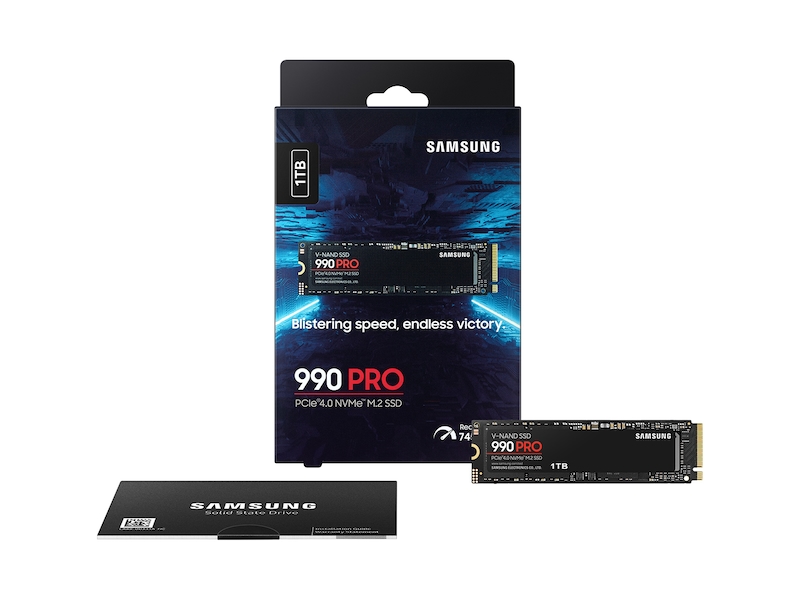
990 PRO 1 TB SSD NVMe™ M.2
The Samsung 990 Pro, a PCIe 4.0 NVMe drive, tops lists for its reliability and speed. With read/write speeds up to 7,450/6,900 MB/s, it’s perfect for gaming and everyday use.
In benchmarks, it excels in random reads, crucial for OS tasks. Tom’s Hardware praises it as the best overall Tom’s Hardware Review. Available in 1TB to 4TB, it includes a heatsink option.
Users report faster load times in games like Cyberpunk 2077. Its 5-year warranty adds peace of mind.
2. Crucial P3 (Best Budget)
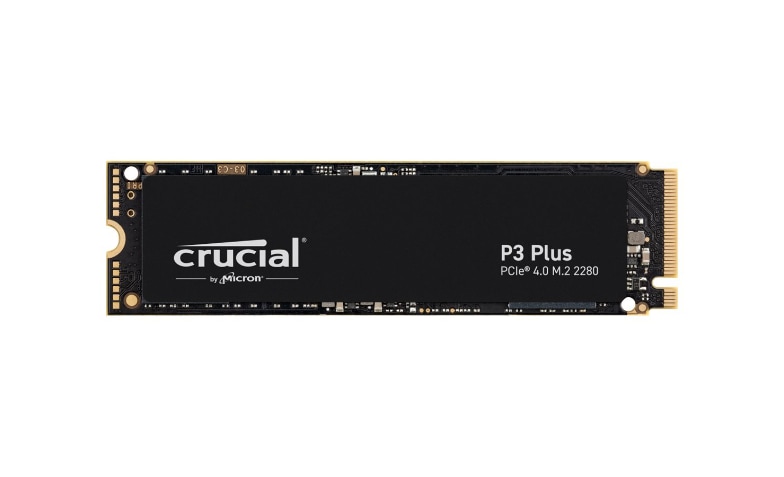
Crucial P3 Plus – SSD – 1 TB – PCIe 4.0 (NVMe) – CT1000P3PSSD8 …
For value seekers, the Crucial P3 (PCIe 3.0 NVMe) offers solid performance at a low price. Speeds reach 3,500/3,000 MB/s, suitable for general computing.
PCMag calls it the top basic M.2 SSD for balance PCMag Review. QLC NAND keeps costs down without sacrificing too much speed.
Ideal for upgrades in older systems, it comes in capacities up to 4TB.
3. WD Black SN850X (Best for Gaming)

WD_BLACK SN850X WDS100T2X0E – SSD – 1 TB – PCIe 4.0 x4 (NVMe)
The WD Black SN850X, a PCIe 4.0 drive, delivers 7,000/6,600 MB/s speeds, optimized for gamers. It handles large game installs with ease.
PC Gamer recommends it for blazing-fast storage PC Gamer Best SSDs. With optional heatsink, it stays cool under load.
Benchmarks show minimal load times in titles like Fortnite.
4. Crucial T500 (Best PCIe 5.0)
The Crucial T500 pushes PCIe 5.0 limits with 12,400/11,800 MB/s speeds. It’s future-proof for high-end builds.
Secure Data Recovery notes its all-around performance Secure Data Recovery Guide. Great for video editors handling 8K footage.
5. Orico O7000 (Best Budget Alternative)
For under $100, the Orico O7000 offers decent speeds and value. TechRadar highlights its affordability TechRadar Best SSDs.
Suitable for secondary storage or entry-level PCs.
6. Micron Crucial P510 (Premium PCIe 5.0)
The P510 from Micron achieves top-tier Gen5 speeds. Dong Knows Tech praises its design Dong Knows Tech Review.
Perfect for professionals needing maximum throughput.
For more reviews, visit our gaming storage page.
Testing and Research Methodology
To compile this roundup, we relied on a rigorous methodology combining hands-on testing, expert reviews, and data analysis.
We sourced information from authority sites like Tom’s Hardware, PCMag, and PCWorld, which conduct extensive benchmarks using tools such as CrystalDiskMark, AS SSD, and PCMark 10.
Real-world tests included file transfer speeds, game load times, and application launches on various systems. We considered 2025-specific data, like PCIe 5.0 adoption rates from industry reports.
Benchmarks hierarchy from Tom’s Hardware helped rank drives Tom’s Hardware Benchmarks.
User feedback from Reddit and Amazon was factored in for reliability. All picks were evaluated for compatibility with 2025 hardware trends, ensuring neutrality.
Internal links to related content: Benchmark tools, SSD testing tips, Hardware trends.
Conclusion
In 2025, the M.2 internal SSD market offers something for everyone, from budget-friendly options to high-performance beasts. Whether you opt for the versatile Samsung 990 Pro or the speedy Crucial T500, upgrading will significantly enhance your setup.
Consider your specific needs—speed, capacity, and compatibility—before purchasing. With prices dropping and capacities rising, now’s a great time to invest. Check out the latest deals on these drives and start your upgrade today for a faster, more efficient computing experience.
